Google Tasks
Comes free with your sign-in. When you connect Google Calendar, you connect Google Tasks too. Google does not ask for a second consent.
What Diarized reads
- How long it takes
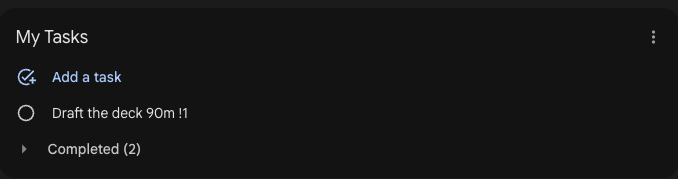
- Write the length in the title, because Google Tasks has no duration field: “Draft the deck 90m”. Diarized removes the marker from the block name on your calendar.
- How urgent it is
- Write the priority in the title too, from !1 to !4, highest to lowest: “Draft the deck 90m !1”. Google Tasks has no priority field.
- When it is due
- Google Tasks' own due date. Google stores a date and not a time.
- How to mark it done
- Tick the task in Google Tasks, or use the “Mark done” link in the block.
What gets scheduled
Every open task in the lists you chose. Diarized reads your own lists only, so a task on a shared family account stays where it is.
Worth doing
- “Book flights 45m !2” books 45 minutes at the second-highest priority.
- A task with no markers is 30 minutes at the lowest priority. This is enough for a chore and wrong for important work.
The one thing to know
Google Tasks is the only source with no duration field and no priority field, so both must travel in the title. This works. But if you choose a task app now, each of the others gives the scheduler more to use.
← All guides · Connect Google Tasks · Everything Diarized supports